


• Events & Webinars
  • Resources
    • Blog
    • Case Studies
    • News
    • Newsletter
    • Infographics
    • Papers
    • Posters
    • Video
  • Careers
    • Careers at HBS
    • Open Positions
    • Student Opportunities
  • About HBS
    • About Us
    • Leadership
    • Locations
    • Partners
    • Green Initiatives
  • Events & Webinars
  • Resources
    • Blog
    • Case Studies
    • News
    • Newsletter
    • Infographics
    • Papers
    • Posters
    • Video
  • Careers
    • Careers at HBS
    • Open Positions
    • Student Opportunities
  • About HBS
    • About Us
    • Leadership
    • Locations
    • Partners
    • Green Initiatives
HBS logo
HBS Logo
  • Infrastructure
    • CLOUD

      • Cloud Solutions
      • Public Cloud
      • Hybrid Cloud
      • Infrastructure as a Service
      • Cloud Security Solutions
      • Backup, Replication and Disaster Recovery
      • HBS Cloud Hosting Services

      DATA CENTER

      • Data Center Solutions
      • Traditional Data Center
      • Hyperconverged
      • Colocation
      • Directory Services
      • Cloud Email and Calendar Solutions

      NETWORK AND ACCESS

      • Network Infrastructure
      • Enterprise Mobility
      • Wireless Solutions
      • SD-WAN
      • Structured Cabling
      • Staff Augmentation
  • Managed Services
    • MANAGED ONE

      • Managed One Overview
      • Managed Backup and Disaster Recovery
      • Managed Firewall
      • Managed SaaS Security


      • Managed HaaS and SaaS
      • Managed IT Help Desk
      • Managed Network and Server Monitoring
      • Managed Email and Collaboration Security

      HBS + PARTNER SOLUTIONS

      • HBS Secure with Verkada
      • HBS Collaborate with Webex
      • Managed XDR
      HBS Managed One Megamenu Graphic
  • Modern Workplace
    • MICROSOFT

      • Microsoft Licensing Management
      • Microsoft Modern Workplace
      • Microsoft Fabric


      • Dynamics 365 Business Central
      • Dynamics 365
      • Dynamics GP

      COLLABORATION

      • Audio Visual
      • Unified Communication Solutions
      • HBS Collaborate with Webex
  • Professional Services
    • ADVISORY

      • Virtual CISO
      • Virtual CIO
      • Project Management
      • IT Business Consulting

      ENGINEERING SERVICES

      • Staff Augmentation

      AI & ANALYTICS

      • Artificial Intelligence
      • AI Advance
      • AI Predict
      • AI Assist
      • Data Management and Analytics
      • Microsoft Fabric

      APPLICATION INNOVATION

      • Website Development
      • Application Development

      DOCUMENT MANAGEMENT

      • Document Management Services
      • Document and Check Scanners
  • Security
    • CYBERSECURITY

      • Managed XDR
      • Penetration Testing
      • Vulnerability Scanning
      • Email Security Services
      • Digital Forensics and Incident Response
      • Backup, Replication and Disaster Recovery
      • Firewalls
      • Cloud Security Solutions


      • Virtual CISO
      • Virtual Security Team
      • Virtual Security Engineer
      • Cybersecurity Risk Assessment
      • Governance and Compliance
      • SOC 2
      • CMMC
      • Managed Security Awareness Training

      PHYSICAL SECURITY

      • Security Solutions
      • HBS Secure with Verkada
      Cybersecurity Risk Assessment Megamenu Graphic
  • Search
Contact Us
Blog

Fortify Your Data with Azure’s Disaster Recovery as a Service (DRaaS) Solution

  • Written by: Matt Eide
  • October 6, 2023
Employees Collaborating

Safeguarding Data in the Digital Age

As unexpected data loss incidents become the norm rather than the exception, having a robust disaster recovery solution is not just wise – it is vital.

Disaster Recovery, as part of an organization's Resiliency, ensures:

  • Availability & Integrity: Ensure the availability and integrity of critical data and services.
  • Minimized Downtime: Dramatically reduce loss in productivity and revenue.
  • Regulatory Compliance: Meet essential regulatory requirements with ease.

Azure Site Recovery: A Comprehensive Overview

Azure Site Recovery was designed to meet the need for reliable and cost-efficient recovery. Azure's Site Recovery solution offers best-in-class results in the unfortunate event of a data loss disaster. Using Azure Site Recovery, organizations can trust that their data is secure and can be restored quickly amid a disaster, saving time, money, and an organization’s valuable reputation. With its flexible and scalable platform, Azure is the ultimate solution for those seeking to minimize downtime and keep their data safe. Azure Site Recovery is a cloud-based Disaster Recovery as a Service (DRaaS) solution that can workload running in public cloud or on-premises datacenters. The cost of Azure Site Recovery is based on consumption of storage and number of workloads protected. The replicated workloads can leverage all the resiliency features built-in to Azure. Once a protected workload is replicated to Azure, you can leverage all the tools built-in to Azure to tailor your recovery plan to meet your business needs. Azure Site Recovery is designed to address customer use cases to protect IaaS workloads in Azure and/or protect on-premises workloads to Azure. Let’s explore these two use cases:

Protect in Azure

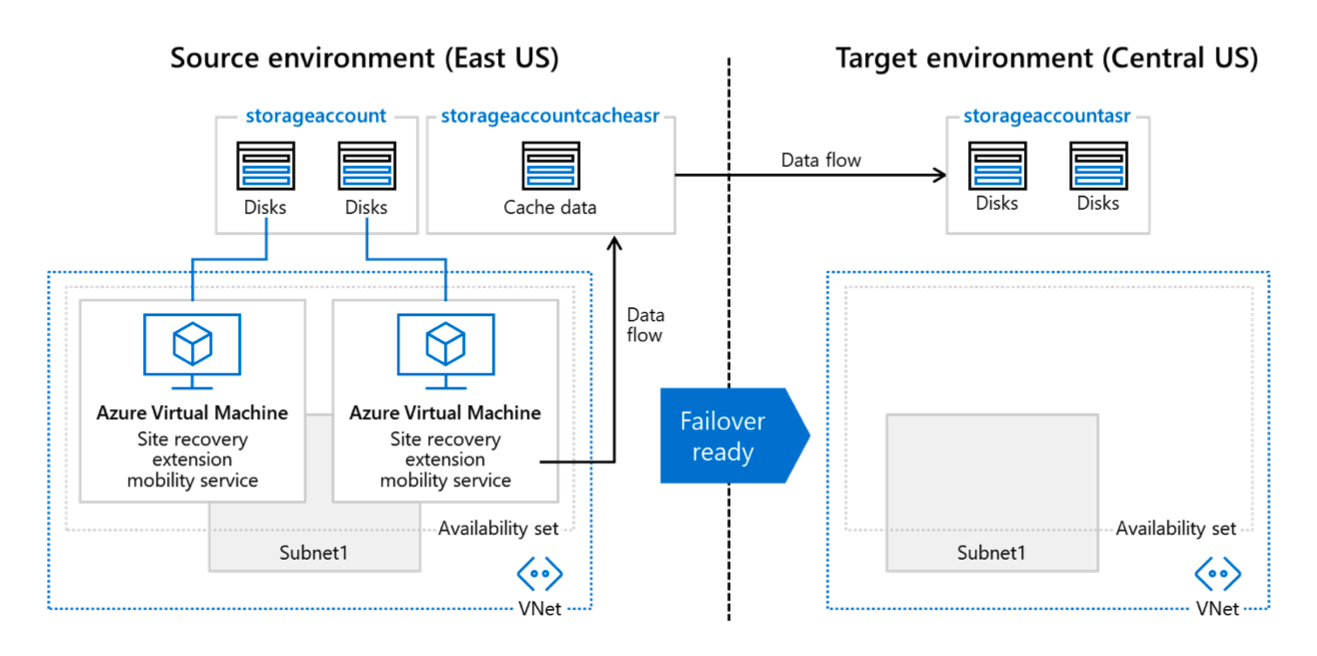
Source disks attached to IaaS workloads in a source region are replicated to managed disks in a target region. The source virtual machine data is continuously replicated to the secondary region. This diagram illustrates a data flow for failover readiness between a "Source environment (East US)" and a "Target environment (Central US)" using Azure services. Here's the description: 1. **Source environment (East US)**: - Contains two **Azure Virtual Machines** that have the "Site recovery extension mobility service" labeled beneath each of them. - Each of these virtual machines is connected to a separate **storage account**. The storage accounts have icons labeled "Disks" indicating storage. - Another storage labeled as "storageaccountcacheasr" with an icon for "Cache data" is connected to one of the Azure Virtual Machines and has a data flow arrow pointing upwards. - Both virtual machines are encompassed within a dotted line box labeled "Availability set" and "Subnet1", indicating they are part of the same subnet and availability set. - At the bottom, there's an icon indicating "VNet", suggesting the entire setup is within a virtual network. 2. **Data flow**: - An arrow labeled "Data flow" moves from the "Cache data" in the Source environment to the "Failover ready" block. - Another "Data flow" arrow moves from the "Failover ready" block to the Target environment. 3. **Target environment (Central US)**: - Contains a **storage account** labeled "storageaccountasr" with two icons indicating "Disks". - The entire storage setup is encompassed within a dotted line box labeled "Availability set" and "Subnet1", suggesting it's part of a subnet and availability set. - The storage account is ready for data, which is indicated by a block labeled "Failover ready". - At the bottom, there's an icon indicating "VNet", suggesting the entire setup is within a virtual network. Overall, the diagram showcases the infrastructure in place for failover readiness from a source to a target environment using Azure Virtual Machines, Storage Accounts, and Networking components.
Protect to Azure

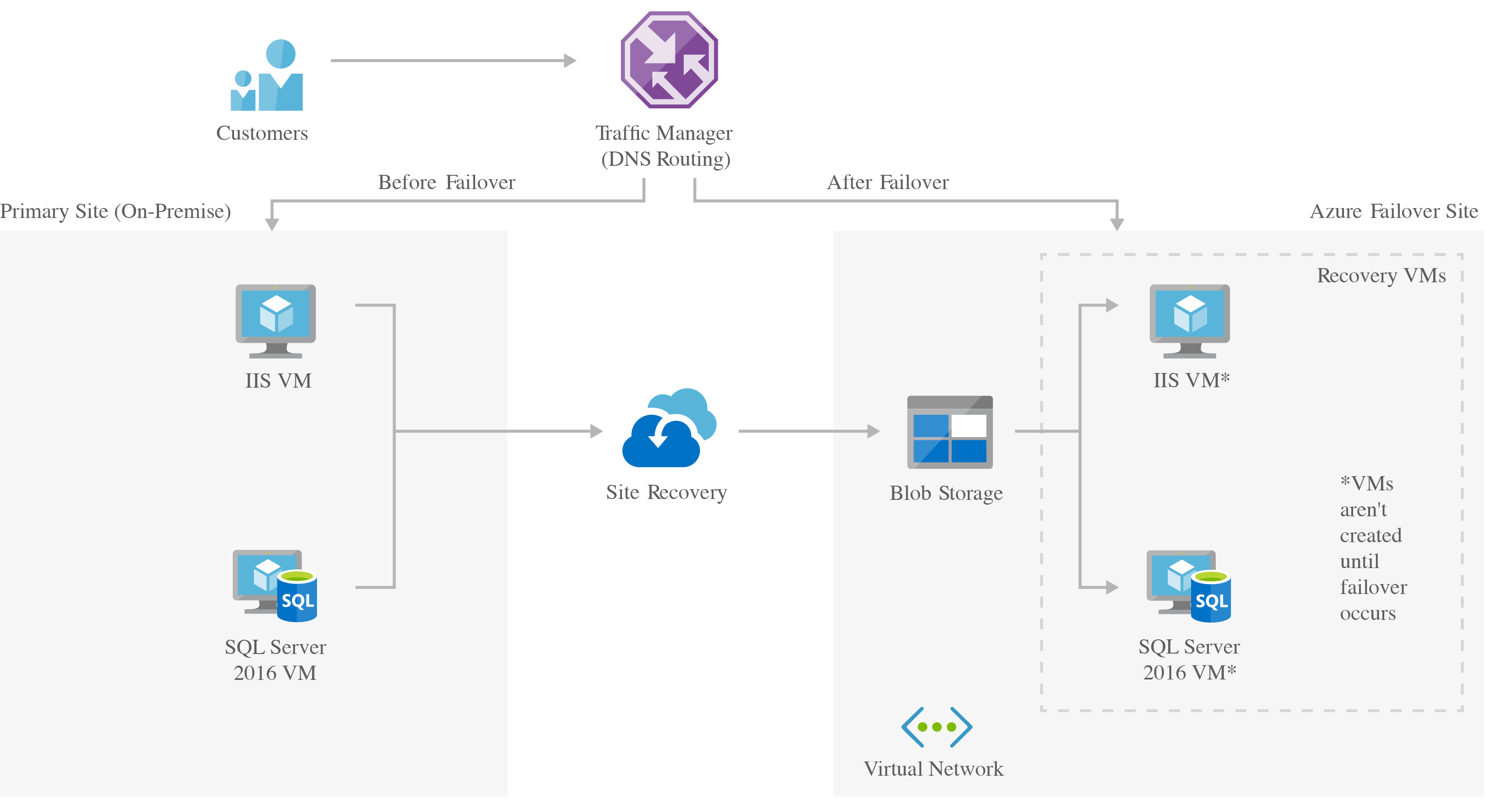
Azure can be used as a secondary, highly resilient failover location for workloads running in your existing datacenters, offering backup and recovery. On-premises virtual machines or bare metal servers are replicated to managed disks or blob storage in the Azure region being used for disaster recovery. This is a diagram depicting the infrastructure setup for a hybrid cloud environment comprising of both "On-premises" and "Azure" setups. Here's a description of the layout: 1. **On-premises**: - **Capacity**: A top label indicating available resources. - **Application Gateway**: A gateway icon representing the entrance point for web traffic. - **Web**: Contains an "AV Set" label and two rectangular server icons indicating web servers. - **Load Balancer**: An icon representing the load balancer to distribute incoming application traffic. - **Application**: Contains an "AV Set" label and two rectangular server icons indicating application servers. - **Disks**: Three horizontal line icons indicating storage capacity. - **Database**: A cylindrical database icon at the bottom. 2. **Azure**: - **Capacity**: A top label indicating available resources on Azure. - **Application Gateway**: A gateway icon representing the entrance point for web traffic. - **Web**: Contains an "AV Set" label and two rectangular server icons indicating web servers. - **Load Balancer**: An icon representing the load balancer. - **Application**: Contains an "AV Set" label and two rectangular server icons indicating application servers. - **Replica Disks**: Three horizontal line icons indicating replicated storage capacity. - **Database**: A cylindrical database icon at the bottom, labeled "Database". 3. **Clients**: - **Traffic Manager**: An icon representing a traffic manager to manage client requests. - **Global Vnet Peering**: A label connecting the "Clients" to both "On-premises" and "Azure" setups. The diagram visually emphasizes a connection between On-premises and Azure through the "Global Vnet Peering".
Versatile Recovery Options

You can tailor your disaster recovery strategy to your organization's specific needs, ensuring that critical data and services are prioritized. ASR is highly customizable and automatable, making it adaptable to your organization's unique requirements. Azure Site Recovery can provide either an entirely cloud-based solution or a hybrid model that meets most use cases including:
  • Azure to Azure
  • VMware to Azure
  • Hyper-V to Azure
  • Bare metal to Azure
Azure Site Recovery can replicate to both Azure and on-premises targets. Using the Azure Portal, seamless coordination is provided between cloud and on-site devices to ensure a smooth transition to the cloud during disasters and a seamless fail-back once the situation is resolved. Incorporating point-in-time snapshots of your data allows fail-over to a desired point in time, granting you unprecedented control over your data recovery process.

Centralized and Secure Management

The Azure Portal provides centralized management from any internet connection to simplify the often-complex world of disaster recovery. The Azure Portal eliminates dependencies on on-premises tools and streamlines the safeguarding of your organization's critical data and services. Azure Site Recovery leverages Azure’s e-built-in security measures, providing peace of mind in an increasingly vulnerable digital landscape. Your data is protected against potential threats, ensuring that your organization's assets remain secure despite adversity.

Cost and Efficiency: The Azure Advantage

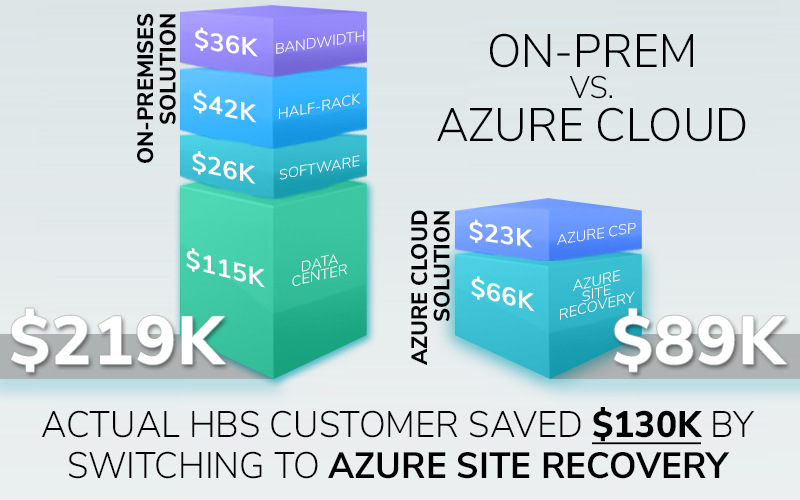
Traditional disaster recovery solutions often necessitate managing backup resources and establishing secondary data centers—an expensive and resource-intensive endeavor. Using Azure as a secondary datacenter eliminates the need to provision and maintain dedicated infrastructure, offering a zero-infrastructure solution and significantly lowering operational costs. Azure's cost-effectiveness translates into a remarkable return on investment, freeing up valuable resources for other critical aspects of your organization. An HBS customer recently saved over $130,000 by switching to Azure Site Recovery. Some organizations have seen up to a 370% 5-year ROI.
ASR's Impressive Stats

The proof of Azure's effectiveness in disaster recovery lies in the statistics:
  • 80% reduction in data recovery time: Azure Site Recovery (ASR) boasts an impressive reduction in recovery time, ensuring that your services can be up and running within minutes of an outage.
  • 97% decrease in lost end-user productivity from data loss: Protecting against data loss is paramount. Azure's disaster relief solutions drastically reduce the risks associated with it, safeguarding your organization's productivity and reputation.
  • Best-in-class recovery time objectives (RTO) and recovery point objectives (RPO): ASR supports minutes of RTO and near sync RPO, the best in the public cloud disaster recovery industry.

The Bottom Line: Being Prepared in an Uncertain World

In today's world, disasters and data loss are more a matter of "when" than "if." Unfortunately, unexpected data loss is not a rare occurrence - on average, organizations experience four data disruptions per year, and more than half of companies have experienced prolonged (more than eight hours) downtime (DataCore) due to data loss. Implementing disaster recovery tools is not just a wise decision—it is a necessity. Azure's Site Recovery’s centralized management, built-in security, cost-effectiveness, and impressive ROI statistics make it a top choice for organizations looking to fortify their disaster recovery strategies. When you deploy Azure Site Recovery your organization now will be better prepared to face adversity head-on, recover swiftly, and ensure business continuity despite the unexpected.

Choosing Heartland Business Systems

As an Azure-preferred partner, Heartland Business Systems offers exceptional expertise in disaster recovery planning, implementation, optimization, and managed services.

Ready to Fortify Your Organization’s Data?

Safeguard your future and partner with Heartland Business Systems. Contact HBS today.
Related Content

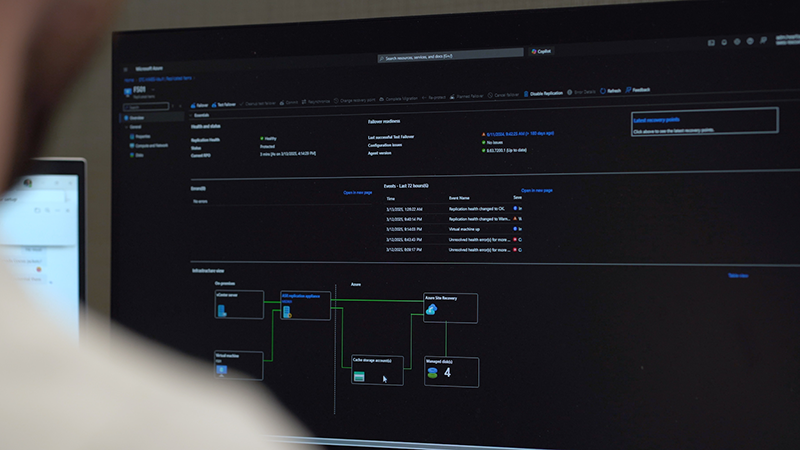
Azure Migration hero image with the text "Hassle-Free Azure Migration" on a white and grey textured background. There is a Microsoft Azure logo in the bottom right and a blog indicator text in the upper left.

Take the Guesswork Out of Azure Migration with an Assessment

Migrating to Azure but unsure of the first steps? An Azure Migration Assessment provides the clarity you need on costs, performance insights, risks, and more.
Learn More »
Azure Site Recovery SwissTek

Swiss-Tek Modernizes Disaster Recovery with Azure and HBS

After a ransomware scare exposed gaps, Swiss-Tek partnered with HBS to build a hybrid disaster recovery solution using Microsoft Azure—boosting resilience, reducing downtime, and restoring peace of mind.
Explore More »
Backup Replication Disaster Recovery service

Backup, Replication and Disaster Recovery

Ensure data resilience with HBS’s Backup, Replication and Disaster Recovery solutions. Get reliable data protection and expert support tailored to your needs.

Read More »
  • Azure, Cloud, Data Safety, Disaster Recovery, Hybrid Cloud
Blog

Connect:

[email protected]  |  800.236.7914

HBS logo

HQ | 1700 Stephen Street
Little Chute, WI 54140
Locations

HBS Remote Support | Service & Technical Support | E-Bill Portal
Terms & Conditions | Cookie Policy | Privacy Policy | Onboarding Form | End User Agreements | E-Bill FAQ | Site Map
©2025 Heartland Business Systems. All rights reserved.

Halo from HBS
This chat may be recorded as described in our Privacy Policy.