


Microsoft to Begin Deleting Unlicensed OneDrive for Business Accounts
- Read time: 3 mins.

Microsoft announced in June 2026 that unlicensed OneDrive for Business accounts are at risk of deletion after 365 days of unpaid storage. The change begins taking effect in early July 2026 and applies to all commercial tenants. This was originally announced by Microsoft in 2025, with enforcement beginning this year.
If your organization has unlicensed OneDrive accounts sitting in Microsoft 365 Archive, the clock is running.
Note: This does NOT apply to education or government tenants.
What Exactly Is Changing for OneDrive

When an employee leaves and their Microsoft 365 license is removed, their OneDrive account doesn’t disappear immediately. Microsoft moves it to Microsoft 365 Archive, where admins can still access it—provided they’re paying for the storage ($0.05/GB/month)
Until now, retention policies and eDiscovery holds could keep that archived data alive indefinitely without paying for storage. Under MC1381110, Microsoft says these unlicensed OneDrive accounts may be deleted after 365 days regardless of active retention policies, compliance holds, or eDiscovery cases. Compliance settings no longer override the deletion timeline, and the rollout is staggered, so the exact enforcement date will vary by tenant.
Why Compliance Teams Should Pay Attention
Consider this common scenario. An employee leaves, IT removes the license, HR closes the offboarding ticket, and legal assumes the retention policy has the data covered. No one pays for archival, and twelve months later the data is gone. Data that could include files that were subject to a litigation hold.
Most organizations’ offboarding workflows don’t explicitly account for OneDrive data retention decisions at the point of license removal. Before July 2026, that gap was forgivable because compliance holds provided a backstop. However, going forward, they do not.
How Unlicensed OneDrive Accounts Accumulate
Before you can act, you need to understand the scope of what you’re dealing with. Unlicensed OneDrive accounts build up from several sources like:
- Employee offboarding
- License downgrades (E3 to F1, for example)
- Contractor and temporary staff accounts
- Accounts inherited from mergers or acquisitions
- Reassigned departmental or shared licenses
Organizations that have been in Microsoft 365 for several years likely have more of these accounts than they realize, and many will have been sitting in archive long enough to approach the 365-day threshold.
How to Find Unlicensed OneDrive Accounts
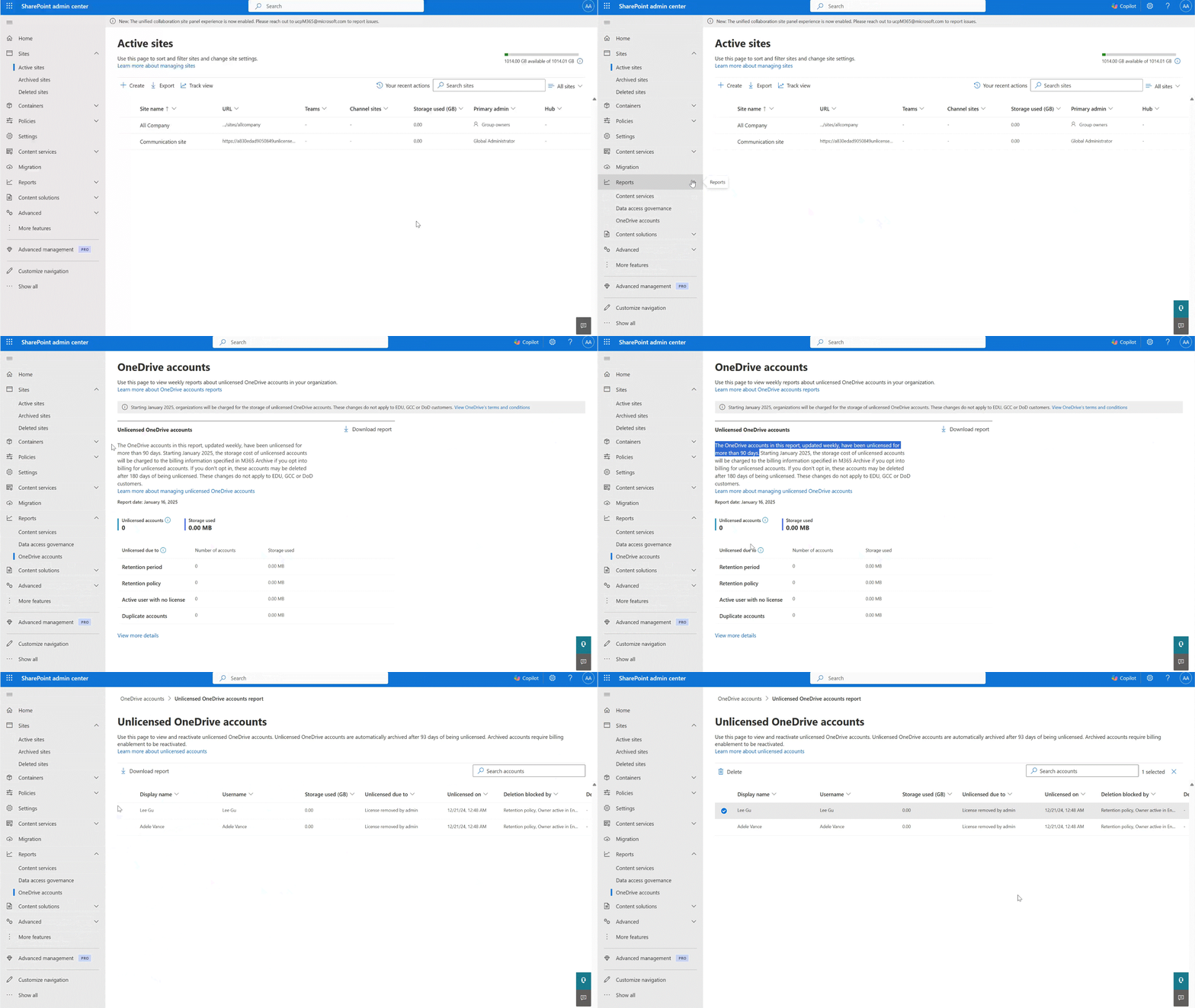
Start in the SharePoint admin center, where Microsoft provides an unlicensed OneDrive accounts report. The report provides visibility into account status and why accounts are unlicensed. Retention and gold details may require additional investigation.
Options for Each Unlicensed OneDrive Account
Once you have your list, accounts generally will fall into one of three paths:
Let it delete.
If the data has no compliance, legal, or business value, deletion is the right outcome. Most accounts will land here.
Pay to archive it.
Enable pay-as-you-go billing through Microsoft 365 Archive in the SharePoint admin center. This makes the most sense for accounts tied to active litigation holds or ongoing compliance requirements.
Recover and migrate the data.
Restore the account, pull the relevant files, and move them to an active location or compliant archive. Choose this when content has active business value or needs to transfer to another owner.
To route accounts quickly, ask three questions:
- Is this account under a legal hold?
- Does it contain files tied to an active project or client?
- Does this need to be reviewed by the compliance team?
If the answer to all three is no, deletion is likely the right call.
Building OneDrive Data Retention into Your Offboarding Process
The account cleanup is a one-time task, but the process gap it exposed will keep producing the same problem unless you close it. Add a OneDrive data review step to your offboarding checklist at the point of license removal, and define a default policy for what happens to OneDrive data when someone leaves. Legal and compliance teams need to understand that retention policies no longer serve as a safety net past 365 days, and decisions for any account where compliance is a factor should be documented.
Getting the process right now means you won’t be making these decisions under pressure when a deletion notice surfaces during an active legal matter.
Talk to HBS About Your Microsoft 365 Environment
HBS works with organizations to audit their Microsoft 365 environments, close governance gaps, and build offboarding processes that protect data without creating long-term liability.
If you’re not sure where to start, our team can help you find what’s at risk and build a plan to address it.
Related Content

Microsoft Licensing Management
HBS optimizes cloud licenses with expert Microsoft licensing management. Get strategic guidance, direct support, and tailored solutions for your needs.
Best Microsoft Copilot Prompts—And How to Write Them
Write effective Microsoft Copilot prompts with examples for Word, Excel, PowerPoint, Outlook, Teams and more. Boost accuracy and productivity today.
Microsoft Copilot
HBS is a Microsoft Copilot Jumpstart Ready Partner. We help organizations deploy Copilot with confidence—from licensing and security to agent development and workforce training.
